Audit log
Audit log
Console page: Audit log › Audit log in an organization's console, and Monitoring › Audit log in an environment console
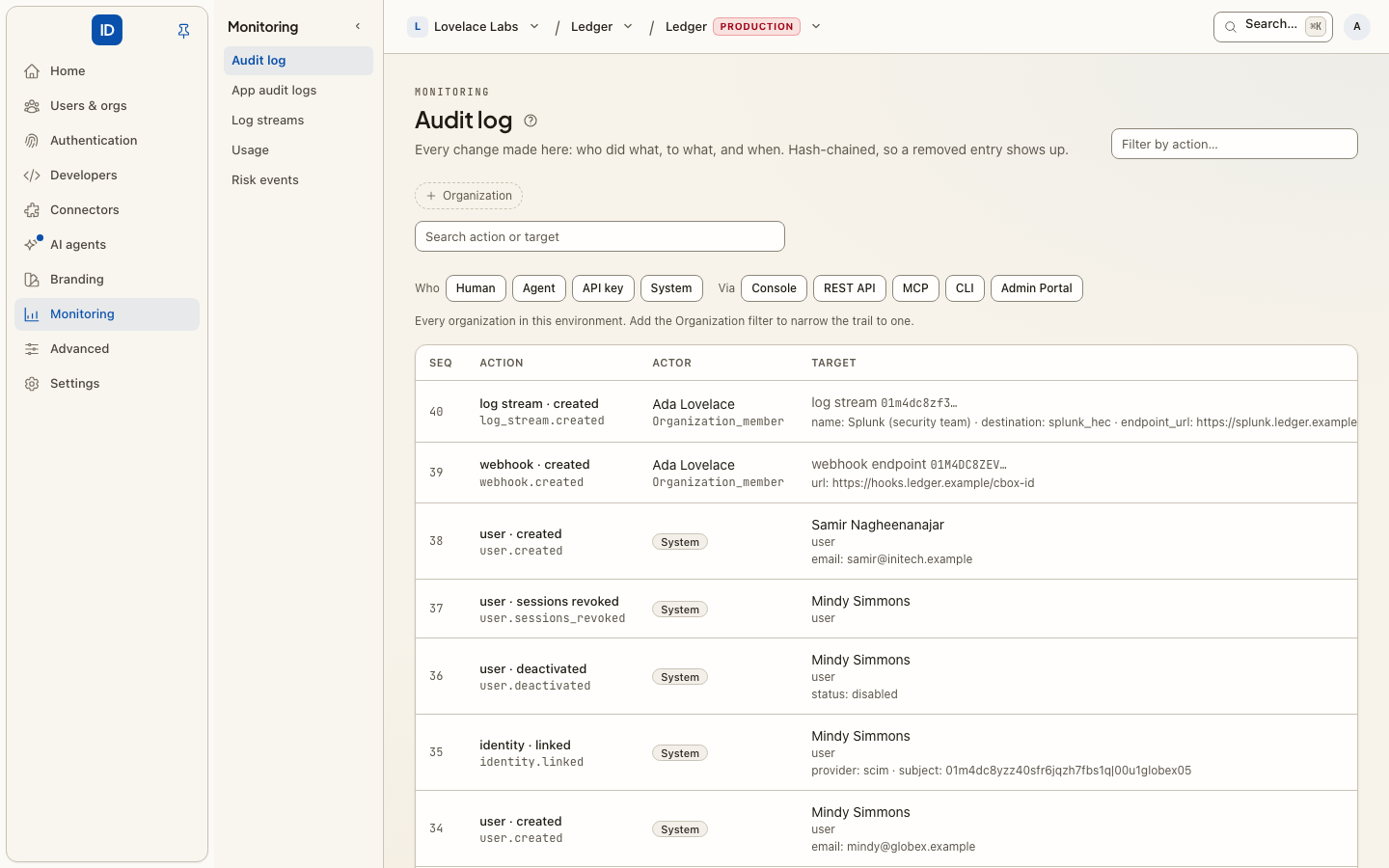
Every administrative change lands here: who did it, what they did it to, and when. Members added and removed, roles granted, connections created and activated, apps registered, secrets stored and rotated, reviews closed, keys minted, approvals given.
It records itself. There is nothing to switch on, and nothing you can do to make it skip an entry.
Audit log or App audit logs?
Two products have "audit" in the name. They answer different questions.
| Audit log (this page) | App audit logs | |
|---|---|---|
| What is in it | What happened in Cbox ID: identities, roles, connections, keys, settings | What happened in your app, as your app reports it |
| Who writes it | Cbox ID itself, on every change | Your app, with POST /api/v1/audit-logs/events |
| Kept for | Forever. It cannot be pruned | A retention you choose, 365 days by default |
| Chain | A hash chain, with signed checkpoints where the deployment signs them | One lighter hash chain per organization |
| Who reads it | Administrators in the console, audit.list on the API |
Your app, and each organization's own admins |
Reading it
Each row says what happened in words and as the exact dotted action
(member.removed), who did it, what it was done to, and when. Under it are up to three
facts the writer recorded, such as a support session's reason.
Narrow it with:
- Filter by action, which matches part of the dotted action:
member.finds every membership change. - Search, which matches the action or the kind of target.
- Who: a human, an agent, an API key, or the system.
- Via: the door the change came through: Console, REST API, MCP, CLI or Admin Portal.
Two details on a row are worth knowing about:
- Approved by. When an agent's key was held for approval and a person said yes, the row names the key as the actor and the person who approved it. See step-up approvals.
- Admin Portal. A change an IT admin made through an Admin Portal link shows Via: Admin Portal, with the link it came through and who created that link.
In an organization's console you see that organization's entries only. An environment console shows the whole environment, with the organization each entry belongs to.
From code, the same entries are the audit.list action (GET /api/v1/audit-log, scope
audit:read), filterable by action, actor_type and organization_id. See
actions.
Tamper-evident
Entries are hash-chained: each one commits to the one before it, so removing or
editing an entry after the fact breaks the chain and is detectable. A signed
checkpoint over the chain's head goes further: it is the only thing that also
detects the newest entries being deleted. Checkpoints are signed when the daily retention
pass runs, and by a daily checkpoint job that the operator of the deployment turns on
(CBOX_ID_AUDIT_CHECKPOINT_SCHEDULE, off by default for reasons explained in
Audit).
Be precise about what that buys you. It is tamper-evident, not tamper-proof: it does not stop someone with database access from rewriting history, it makes the rewrite visible. For an auditor, that is usually the useful property. Nobody has to trust that the log was not edited, because the log can be checked. The mechanics are in Audit.
What you cannot do here
- Edit or delete. The log is read-only, on purpose. There is no edit, no delete and no retention slider. A log an administrator can prune is not evidence.
- Learn why. It answers "who", not "why". For sensitive changes, the reason belongs
in your own change process. The exception is a support session:
support_session.startednames the administrator, the person they signed in as, the app and the reason they gave, on the organization's own log.
Getting it out
- Log streams mirror every entry into your SIEM as it is written.
- Exports & retention (in an environment console) ships new entries on a schedule and pulls one person's history for a GDPR access request. See compliance.
Related
- App audit logs — your app's own events, per organization.
- Log streams — the same entries in your SIEM.
- Webhooks — notifications about some of the same changes, for your systems to react to.
- Access reviews — periodic certification, recorded here.
- Step-up approvals — how an approval shows up on a row.
- Audit — how the chain works.