Apps
Apps
Console page: Developers › Applications (/apps, or /admin/apps in an environment console)
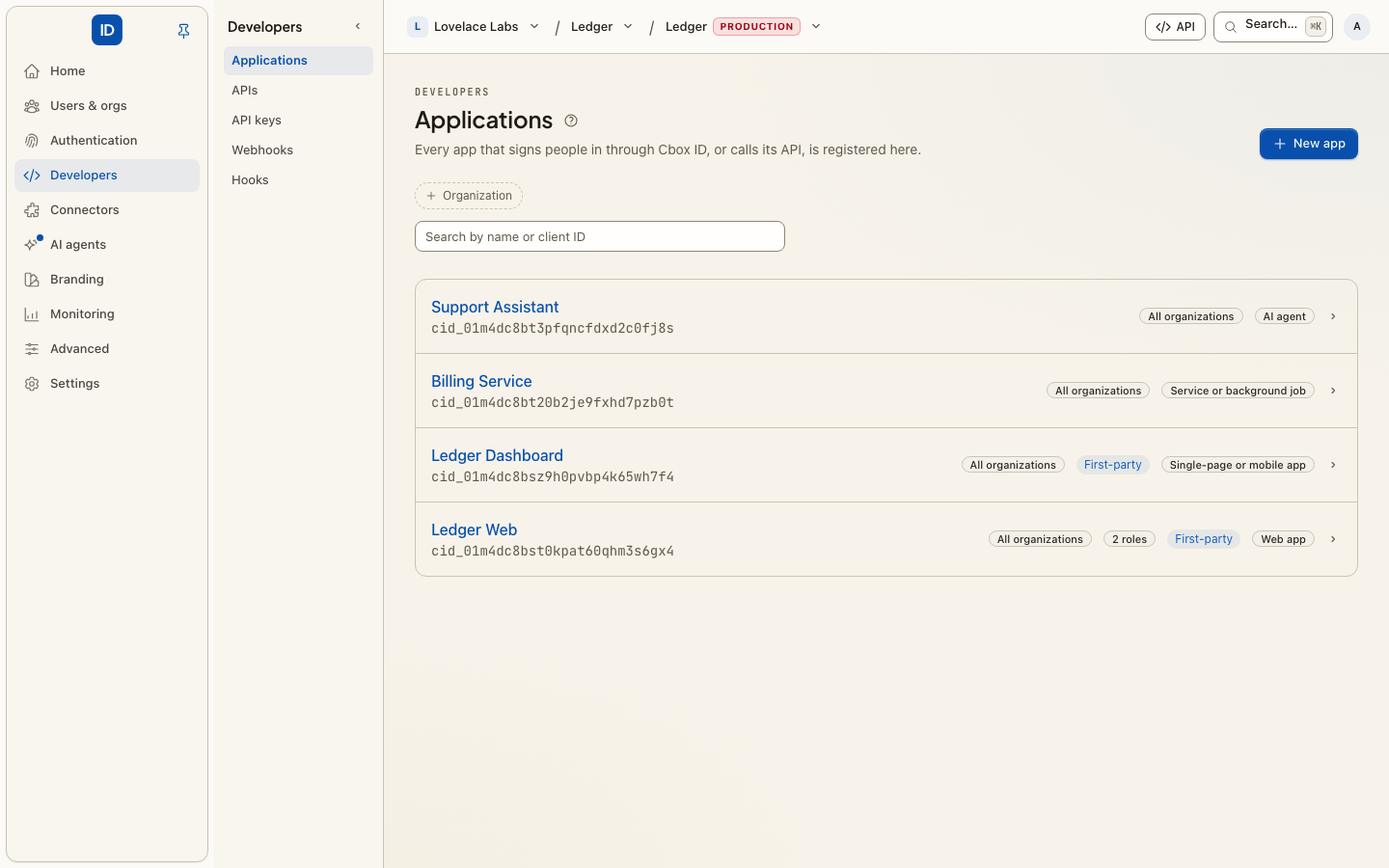
Every app that signs people in through Cbox ID, or calls its API, is registered here and gets its own credentials. Registering an app is what turns Cbox ID from a directory into something your colleagues actually use — it is the step that gives them a thing to sign in to.
Machine keys that are not tied to an app (secret keys, workspace keys and publishable keys) are on the API keys page.
Register one
-
New app, and name it something you will recognise in a list.
-
Answer what kind of app is this? — the one question the form asks. Everything the standard would have you decide separately follows from it:
You answer What it is for What Cbox ID sets up Web app Runs on a server: Laravel, Rails, Next.js, Django. A secret, the sign-in redirect flow, redirect URIs. Single-page or mobile app Runs on the device: React, Vue, iOS, Android. No secret (it could not keep one), sign-in with PKCE, redirect URIs. CLI or device No browser of its own: a terminal, a CI job, a TV. No secret, no redirect URI, the device grant. See Sign in from a CLI. Service or background job Calls the API as itself, no person involved. A secret, client credentials, no redirect URI. AI agent Acts on somebody's behalf, and asks them first. A secret, and the approval flow behind Approvals. Something else A combination none of the above describes. You pick the grants and whether it holds a secret. -
Copy the client ID, and the client secret if the kind you chose has one. The secret is shown once — put it straight into your app's configuration or secret store. A public app (single-page, mobile, CLI) is issued none on purpose: the code runs where a secret could be read out of it.
-
For the kinds that sign people in through a browser, add the redirect URI: the exact URL Cbox ID may send someone back to. It must match what the app asks for character for character, trailing slash and all.
-
Optionally add post-logout redirect URIs — where the app may send people after signing out. If none are listed, Cbox ID keeps them on its own signed-out page.
-
Optionally set a role manifest URL, so the app declares the roles it understands and they appear on the Roles page for you to assign.
An app's four tabs
Open an app and it has up to four tabs, each a page of its own:
- Overview — how to connect it (a snippet per SDK), its issuer and client ID, its name and redirect URIs, its roles manifest, and deleting it.
- Scopes — what the app may ask for, and the audience its tokens will carry. See Scopes below.
- Secrets — for an app that holds a client secret. Not drawn for a public app (it has none) or one that signs in with its own keys.
- Settings — token lifetime, token exchange, back-channel logout and API keys.
An organization's administrator looking at one of the environment's first-party apps sees Overview and Scopes, read-only: those apps are the environment's to change.
Scopes
Scopes are the ceiling on what the app may ask for. Narrowing them takes effect on the next token.
- Sign-in and platform scopes —
openid,profile,emailand the rest, and the scopes of Cbox ID's own API — are ticked in the first list. - Your APIs lists the scopes of every registered API this app may hold, grouped by API. An organization's app is offered its own organization's APIs and the scopes the environment lets every organization's apps request, and nothing else.
- Advanced › Typed scopes keeps free text working for scopes no API owns. A typed scope is unowned: it reaches the app's tokens as it is, but can never carry a registered API's audience. Typing a registered API's scope the app may not hold is refused, and the page says which scope and why.
Above the lists, Token audience says what aud the app's tokens get: the issuer when
no API is involved, the API's identifier when its scopes belong to one API, and a request
for resource when they belong to several.
Secrets
The Secrets tab lists every live secret — the last four characters, when it was created, when it was last used and, for one on its way out, when it stops working.
Rotate secret creates a new one and asks how long the current one keeps working:
immediately, after 1 hour, after 24 hours or after 7 days. Choose an overlap
for routine rotation — roll the new secret out to every deployment, and let the old one run
out — and immediately for a secret that has leaked. Choices longer than this install's
ceiling (CBOX_ID_CLIENT_SECRET_MAX_ROTATION_GRACE, 30 days by default) are not offered.
The new secret is shown once.
Revoke stops one secret working at once — the leaked one, or an old one you do not want to wait out. The app's only live secret cannot be revoked on its own, because that would switch the app off with nothing in its place: rotate it instead, or delete the app. Rotating and revoking both ask for your password first.
Settings
- Access token lifetime — how long this app's access tokens are accepted, in minutes.
Empty uses the install's default. The ceiling is set by whoever runs the install
(
CBOX_ID_MAX_ACCESS_TOKEN_TTL, a day by default) and the page states it. Shorter is safer: an access token cannot be taken back once issued, and refresh tokens keep people signed in meanwhile. - Token exchange — lets the app trade a token it was given for one meant for another of your services, over the standard token-exchange grant (RFC 8693). Only an app that holds a secret or its own keys can use it.
- Back-channel logout — an HTTPS address (HTTP on
localhost) Cbox ID posts a signed logout token to when somebody signs out, an administrator ends their sessions, or they are removed or deactivated. Tick The app needs the session id if it ends one session at a time. - API keys — set a key prefix such as
acme_liveand the people who use the app can create API keys for its API under My account › API keys, each tied to them, one organization and a subset of their permissions in this app. Your API checks a key by calling Cbox ID with this app's own credentials, and a key loses a permission the moment its holder does. The prefix is 2–16 lowercase letters or digits followed by_liveor_test, unique in the environment;cbidis reserved. Clearing it stops new keys; keys already created keep working until revoked.
Each setting saves on its own and is recorded on the audit log as one change.
Take an app to another environment
Two buttons at the top of every tab, for whoever manages the app:
-
Download blueprint — the app's configuration as a JSON file: its name, kind, grants, redirect URIs, scopes, token settings and manifest URL. Never its client ID and never a secret. Commit it beside the app's code, or hand it to the management API.
-
Copy to another environment — in an environment console only. Registers the app again in another environment of the same project that you administer, with a client ID and secret of its own, shown once on this page. The dialog asks for the name and the redirect URIs there, because the other environment's addresses are almost never this one's. Scopes, sign-out URIs, token settings and the manifest URL are copied as they are.
Copying is for the environment's own apps. An app an organization owns cannot be copied — the organization exists in this environment only — and neither can an app that registered itself or one that signs in with its own keys; the dialog says so. If the other environment already has an app with the same API key prefix, clear the prefix on one of them first.
Things worth knowing
- One registration per app, per environment. Sharing credentials between a staging and a production deployment means you cannot revoke one without taking down the other, and the audit log can no longer tell you which one did what. Copy to another environment makes the second registration for you.
- The secret cannot be recovered, only replaced. That is deliberate. If it is lost, or has ever been pasted somewhere it should not have been, rotate it. Registering, editing, rotating, revoking and deleting an app are all recorded on the audit log.
- Redirect URIs are a security control, not configuration. They are the reason an attacker cannot have your app's sign-in send the resulting code to their server. Keep the list exact and short.
- First-party apps appear in your team's launcher on the console overview, so people can get to them without a bookmark.
- Scopes are not permissions. What you tick on the Scopes tab is the ceiling on what that app may ask for. What a person is allowed to do is a permission, composed into a role. The two words are easy to swap; the pages link to each other for that reason.
Troubleshooting
"redirect_uri mismatch" — the URI the app sent is not in the list, exactly.
Compare them character by character; it is almost always a trailing slash, http
vs https, or a port.
The app signs people in but sees no roles — nothing has been assigned, or the app has not declared the roles it expects. See Roles.
invalid_scope from a CLI or an agent — it asked for a scope the app is not
registered for. Those flows are refused rather than quietly given less, because no
browser is in front of them to notice a smaller grant. Either ask for less, or add the
scope on the app's Scopes tab.
invalid_target from the token endpoint — the app holds scopes of more than one
registered API and asked without naming one. Send resource with the API's identifier,
or ask for one API's scopes at a time.
"This app may not hold …" when saving scopes — the scope belongs to a registered API that keeps it from this app: an API another organization owns, or a scope the environment keeps for its own apps. Remove it, or ask the environment's administrators to let organizations' apps request it.
Related
- APIs — the services your apps call, and who owns their scopes.
- API keys — secret, workspace and publishable keys.
- Roles, Webhooks, Token vault.