App audit logs
App audit logs
Console pages: Monitoring › App audit logs in an environment console (with Schemas & retention), an organization's App audit logs tab, and Audit log › App audit logs on an organization's own console.
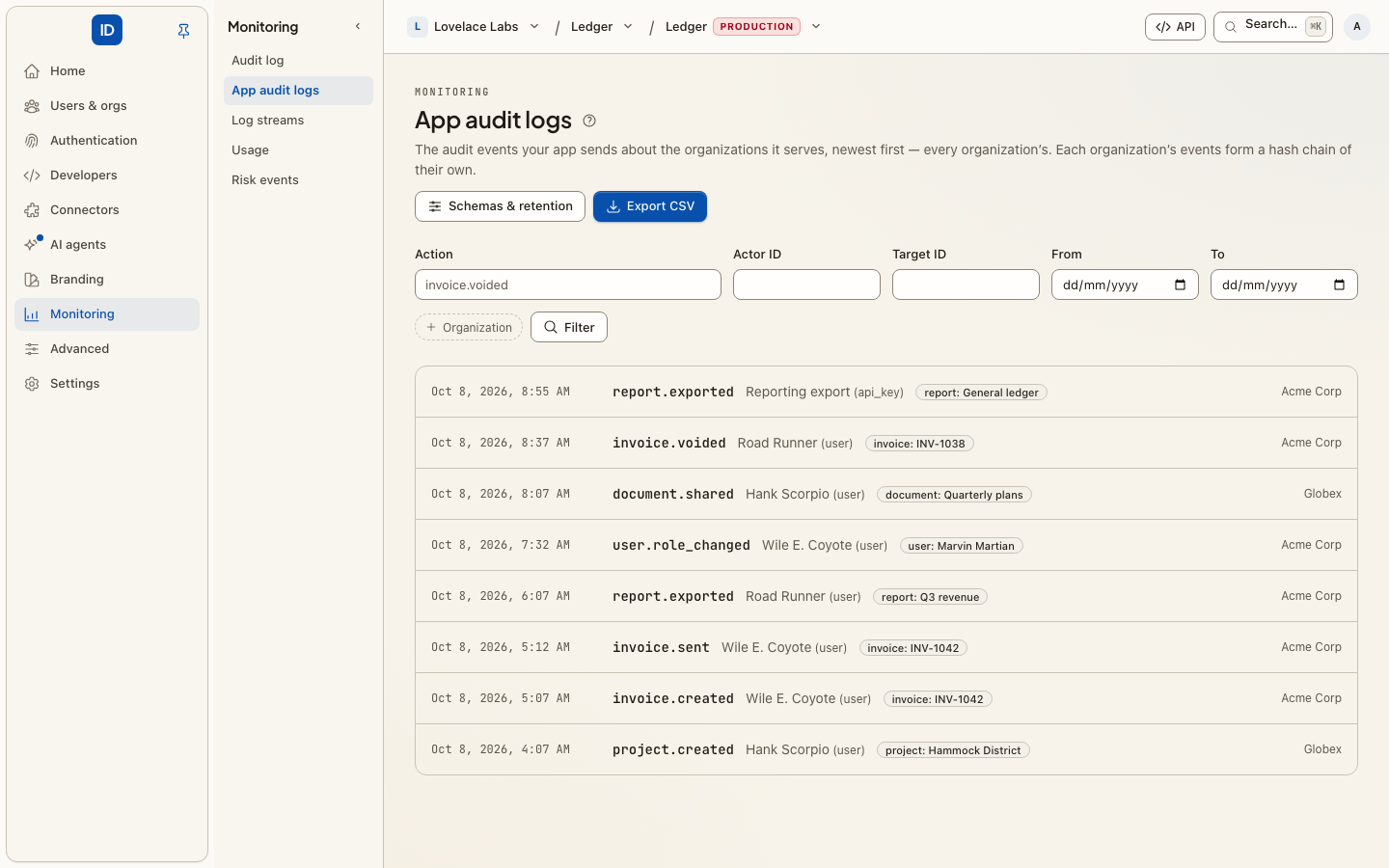
Your customers' security teams will ask what happened in your product: who exported the invoices, who changed the billing contact, who removed that user. App audit logs are where your app records those events, per customer, and where those customers read them.
App audit logs or the Audit log?
They are two different products, and it matters which one you mean.
| App audit logs (this page) | Audit log | |
|---|---|---|
| What is in it | What happened inside your app, as your app reports it | What happened in Cbox ID: identities, roles, connections, keys, settings |
| Who writes it | Your app, with POST /api/v1/audit-logs/events |
Cbox ID itself, on every change |
| Shape | Your actions, actors, targets and metadata, checked against schemas you define | Cbox ID's own actions (member.removed, webhook.created …) |
| Kept for | A retention you choose, 365 days by default | Forever; it cannot be pruned |
| Chain | One hash chain per organization | A hash chain, with signed checkpoints where the deployment signs them |
| Who reads it | Your app, and each organization's own admins, in their console or the Admin Portal | Administrators in the console |
Cbox ID stores app audit events for each customer organization, checks them against schemas you define, keeps them for a retention you set, and shows each organization its own events and nobody else's.
For developers: sending events
Send events to POST /api/v1/audit-logs/events with a management key that has the
audit_logs:write scope. Each call takes a batch of 1 to 100 events, and each event names
the organization (your customer) it happened in:
curl https://your-environment.example/api/v1/audit-logs/events \
  -H "Authorization: Bearer $CBOX_ID_KEY" \
  -H "Idempotency-Key: 7b0c7f3e-batch-0192" \
  -H "Content-Type: application/json" \
  -d '{
    "events": [{
      "organization_id": "01k9…",
      "action": "invoice.voided",
      "occurred_at": "2026-10-08T12:03:11.452Z",
      "actor":   { "id": "usr_42", "type": "user", "name": "Ada Lovelace" },
      "targets": [{ "id": "inv_123", "type": "invoice", "name": "INV-123" }],
      "context": { "location": "203.0.113.7", "user_agent": "Mozilla/5.0 …" },
      "metadata": { "total": 1200, "currency": "EUR", "reason": "duplicate" }
    }]
  }'
actionis dotted words (invoice.voided,user.signed_in), up to 190 characters.occurred_atis ISO 8601 with a time zone, to the millisecond. It may be in the past, for example when you backfill. It may not be more than five minutes in the future.actorneeds anidand atype.nameis what people see in the log.targetslists what the action was done to, up to 50 entries. List filters can find every event that names a target.metadata,actor.metadataand eachtargets[].metadataare flat objects: up to 50 names, each starting with a letter or_, mapped to strings (up to 500 characters), numbers, booleans or null. Nested objects and lists are refused, because an audit log is read by people.
A batch is all or nothing. If one event is invalid, the whole batch is refused with
422 invalid_event, and the message names every problem by its position, for example
events.3.metadata.total. Fix the batch and send it again.
Always send an Idempotency-Key. A retry with the same key and the same body gets
the first answer back (Idempotent-Replayed: true), and nothing is recorded twice. Without
a key, a retry after a timeout can record the batch twice.
The answer is 201 and lists each recorded event in the order you sent them, with its
id, sequence, hash and prev_hash.
Reading and filtering
GET /api/v1/audit-logs/events (scope audit_logs:read) returns events newest first,
50 per page by default and up to 100. To get the next page, pass meta.next_cursor as
after. Filters:
| Parameter | Narrows to |
|---|---|
organization_id |
One organization. Without it, a management key reads every organization's events. |
actions[] |
These actions (up to 50). |
actor_id |
Events this actor caused. |
target_id |
Events that name this target. |
range_start, range_end |
occurred_at at or after the start, and before the end. |
order |
desc (the default) or asc. |
Every filter uses an index, and pages continue from a cursor rather than an offset, so page 500 costs the same as page 1. A cursor only works with the filters that produced it.
Schemas
A schema says what an action's events must look like. Once an action has a schema, every event for that action is checked when it arrives, and an event that does not fit is refused. Actions without a schema are accepted as sent, unless strict mode is on (see below).
Create schemas on Schemas & retention in the console, or with
POST /api/v1/audit-logs/schemas (scope audit_logs:manage):
{
  "action": "invoice.voided",
  "targets": [
    { "type": "invoice" },
    { "type": "customer", "metadata": { "properties": { "tier": { "type": "string" } } } }
  ],
  "metadata": {
    "type": "object",
    "properties": {
      "total":    { "type": "number", "minimum": 0 },
      "currency": { "type": "string", "enum": ["EUR", "DKK"] },
      "reason":   { "type": "string", "maxLength": 200 }
    },
    "required": ["currency"],
    "additionalProperties": false
  }
}
targetslists the target types the action may name. Each type can have its own metadata schema. Leavetargetsout to allow any target type.metadataandactor_metadataare metadata schemas.
Metadata schemas use a subset of JSON Schema, the part that describes a flat object:
type (string, number, integer, boolean, null, or a list of them), enum,
minLength, maxLength, pattern, minimum, maximum, format (date-time,
email, uri, uuid), required, additionalProperties, and the annotations title
and description. If a schema uses any other keyword, it is refused when you save it.
Cbox ID does not save rules it would not enforce.
Replacing a schema (PUT /api/v1/audit-logs/schemas/{action}) creates the next
version. Each event records the schema_version it was checked against, and events
already recorded are never re-checked. DELETE removes the schema.
The schema page also lists recent actions without a schema, taken from the newest events, so you can see which actions to cover next.
Strict mode
With strict mode on, Cbox ID refuses events whose action has no schema. Turn it on once every action your app sends has a schema. Deleting a schema in strict mode means events for that action are refused from then on.
Retention
Each environment keeps events for 365 days unless you change it (1 to 3650 days, on
Schemas & retention or with PATCH /api/v1/audit-logs/settings). Retention counts from
when Cbox ID received the event, not from its occurred_at. A daily job
(audit-logs:prune) deletes events older than that.
Shortening the retention is irreversible. At the next prune, every event older than
the new window is deleted, for every organization in the environment. For that reason
the audit_logs:manage scope is marked critical on the key form.
Export
POST /api/v1/audit-logs/exports (scope audit_logs:export) takes the same filters as the list. It starts a CSV
export that runs on the queue. Poll GET /api/v1/audit-logs/exports/{id} until state
is ready. The answer then includes a url you can download from.
- The URL is signed and works for 15 minutes. To get a fresh one, read the export again.
- The file is kept for 72 hours (
CBOX_ID_AUDIT_LOGS_EXPORT_TTL_HOURS) and then deleted. - An export holds at most 1,000,000 events. For more, split the range.
- Any cell that starts with
=,+,-or@is written with a leading', so a spreadsheet treats it as text instead of a formula.
Creating an export is recorded in the audit log (audit_log_export.created), because
it is how a customer's records leave in one file.
The Export CSV button on every console page runs the same export.
Tamper evidence: what it proves
Each organization's events form a hash chain. Every event has a sequence (1, 2,
3… for each organization) and the prev_hash of the event before it, and
hash = SHA-256( prev_hash + canonical JSON of the event )
where the event is its id, organization_id, sequence, action, occurred_at,
actor, targets, context and metadata, exactly as the API returns them. Canonical
JSON sorts object keys at every depth, keeps lists in order, and does not escape slashes or
non-ASCII characters. An organization's first event has 64 zeros as its prev_hash. If an
event is changed, deleted from the middle of the chain or moved, it no longer verifies.
Because the API returns every hash, you can check the chain yourself against your own
copy.
GET /api/v1/audit-logs/verify?organization_id=… re-hashes one organization's chain,
up to 10,000 events per call (continue from last_sequence + 1). It reports the first
break, if there is one: missing, link, hash or truncated.
What it does not prove:
- It is tamper-evident, not tamper-proof. Someone who can rewrite the database table and the chain head can also recompute every hash. There are no signed checkpoints and no copy in storage the database cannot write to. If you need that, keep the hashes you were given, or stream the events to a SIEM you control (see below).
- It proves integrity, not completeness. An event your app never sent leaves no gap.
- Retention cuts the chain from the front. After a prune, verification starts at the oldest event that was kept, and checks that it still points to the last event that was removed. Pruned events can no longer be verified.
Cbox ID's own audit log uses a stronger mechanism (cboxdk/laravel-audit-chain, with
signed checkpoints), but that chain is append-only and cannot be pruned. Customer events
need a retention period, so they use the lighter chain described here.
Log streams
When an organization owns a log stream, it receives that
organization's audit events as well as its audit log entries. Organization admins can
create a stream on their own console's Log streams page. Each event is delivered with
source: app and its chain fields, so a SIEM can tell your user.created apart from
Cbox ID's. The stream's action filter applies as usual. Environment-wide streams do
not receive audit events: they carry the platform's own record, and your app already has
the data it sent.
Cbox ID does not send a webhook for each audit event. That would send your app back a copy of everything it just sent.
For your customers' admins: reading their own logs
Your customers' admins can read their organization's events in two places:
- Their own console, under Audit log › App audit logs, if they have an account and administer the organization. They see only their organization's events, can filter them, and can export a CSV.
- The Admin Portal, without an account. On the organization's
page in the environment console, choose Admin Portal link and tick Audit logs
(read-only), or call
POST /api/v1/organizations/{id}/portal-linkswith"intents": ["audit_logs"]. Send the single-use link to the customer's IT or security admin. It opens a read-only view of that organization's events, in the admin's language, with filters and an Export CSV button. The download contains the newest matching events, up to 50,000 (CBOX_ID_AUDIT_LOGS_PORTAL_EXPORT_LIMIT), and is recorded in the audit log asaudit_log_export.downloaded. The portal session ends when they click Done, or after 120 minutes (CBOX_ID_PORTAL_SESSION_MINUTES). What they see is in Audit logs, for IT admins.
The organization comes from the portal session, never from the request, so a portal link
can never show another organization's events. Like SSO and directory sync, portal access
requires the organization's plan to include it (CBOX_ID_ENTITLEMENT_AUDIT_LOGS).
On a self-hosted deployment in the default open mode, every organization has access.
Scopes
| Scope | Allows |
|---|---|
audit_logs:write |
Sending events. This is all a backend that only sends events needs. |
audit_logs:read |
Listing and verifying events, reading exports, schemas and settings. |
audit_logs:export |
Starting CSV exports. |
audit_logs:manage |
Creating, replacing and deleting schemas, and changing retention and strict mode. Marked critical. |
Every endpoint is also an MCP tool (audit_logs_events_create, audit_logs_events_list,
…). A token one of your customer's admins signed in with can only read and write that
admin's own organization.
Related
- Audit log — Cbox ID's own record, which is a different thing.
- Log streams — deliver an organization's events to its SIEM as they arrive.
- Admin Portal — let a customer's admin read and export their own events.
- Step-up approvals — changing retention is destructive, so a key with an approval policy may wait for a person.