Roles
Roles
Console page: Members & roles › Roles
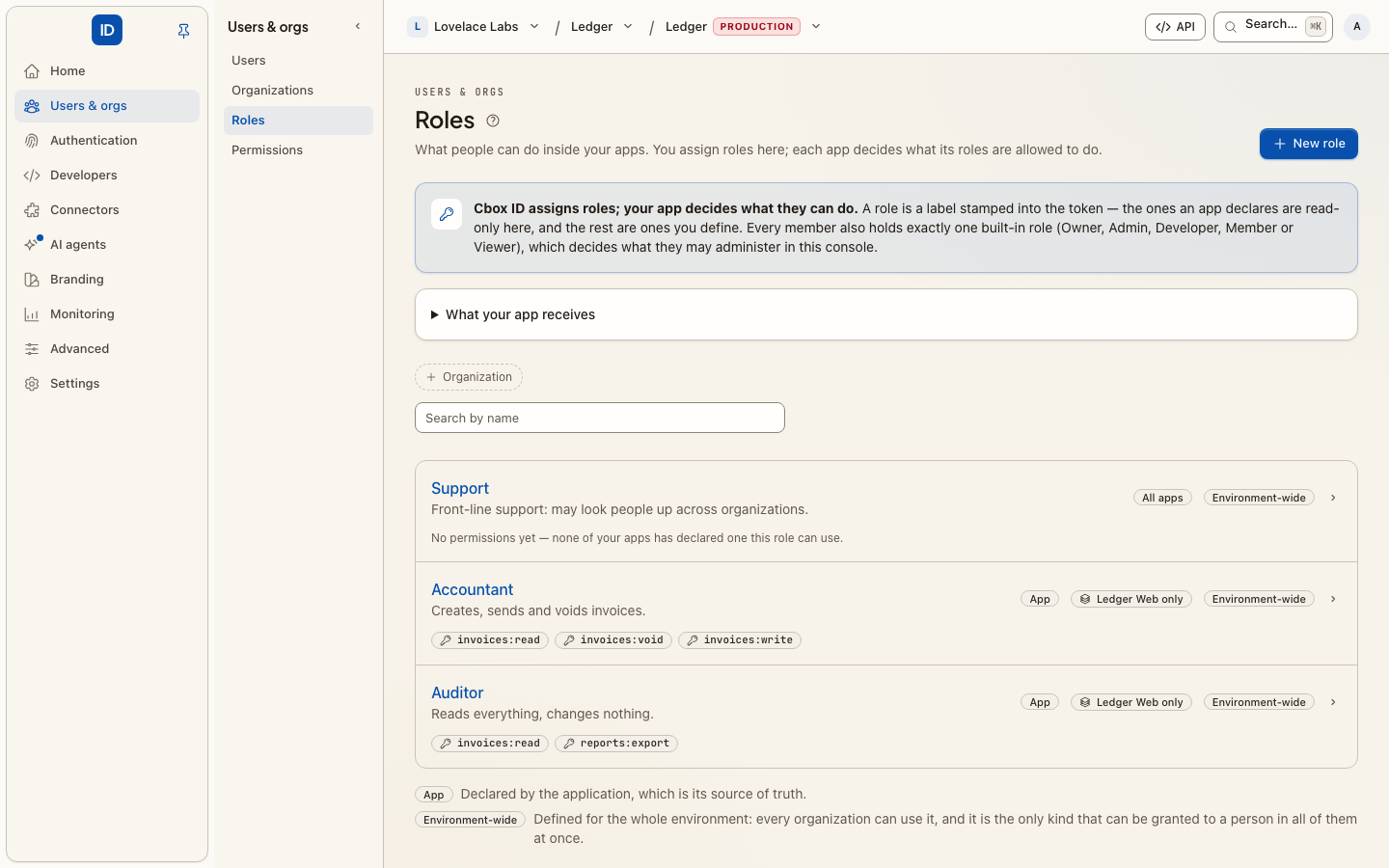
A role is a job title your apps understand: Editor, Support agent,
Read-only. You assign roles to people here; each app decides for itself what
its roles are allowed to do. That split is the whole design, and it is worth
understanding before you create anything:
- Cbox ID owns who holds which role. One place to grant, one place to revoke, one record of both.
- The app owns what the role can do. No app has to ask us for permission semantics, and we never have to model every app's internal rules.
The role travels with the person into every connected app, in their token. Revoke it here and every app sees that on their next sign-in.
Two kinds of role
Custom roles are yours: you create them for your organization, and they mean whatever your apps agree they mean.
App-declared roles come from the app itself. An app tells Cbox ID which roles it understands — either by publishing a manifest at a URL you configure, or by pushing one — and those roles then appear here, ready to assign. This is the better path when the app has real internal permissions, because the list can never drift out of date with the app's own code.
An app-declared role whose app stops declaring it is marked orphaned rather than silently removed, so an existing grant is never quietly reinterpreted.
Saying what a role may do, here
If you want "what can an Editor actually do" written down in the console rather than left to each app's own code, that is what permissions are — and you can write them yourself on the Permissions page without any integration at all.
Assigning
- Person by person on the Members page, in the same Roles control that holds their built-in role.
- Automatically, by mapping a group from your identity provider onto a role — see Directory Sync. For anything above a handful of people this is the one to use: access follows the group, and the group is already someone else's job to maintain.
- At invite time, so someone has the right access the moment they accept rather than after a second chore.
Staff-only roles are not offered here. An app can mark a role it declares as
staff-only ("tenant_assignable": false in its manifest). That is for the app vendor's
own support or back-office people. An organization's administrators never see it on the
Members page, in an invitation or in a group mapping, and a request that names it is
refused. Only an environment administrator can grant it: as a staff role (below), or
inside one organization from that organization's page in the environment console.
Admin and support roles
Console page (environment console): Advanced › Admins & support
An admin & support role (a staff role in the API and in app manifests) is a role you grant to your own people across the whole environment. It applies in every organization, and to a person who belongs to none. No organization's administrators can see it, grant it or take it back.
Every grant above is scoped to one organization, which is right for the people who work inside one. It cannot describe three others:
- Your own support staff, who act across every organization.
- Somebody who has joined no organization. A person exists before they belong anywhere.
- An app with no tenancy of its own. If your app has no notion of organizations, there is no organization to hang a grant on, and it should not have to invent one.
Grant one on the Staff page (the person's email address and the role), or from the person's own page under Admin & support roles. Both lists show the same grants.
Which roles can be staff roles:
- Any role no organization owns. An environment-wide custom role, or a role an app declares.
- An app's own role reaches only that app. Grant the Parcels app's
Supportas a staff role and it is in every Parcels token for that person, in every organization, and in no other app's token. A role for all apps reaches every app's token. The Staff page groups its list this way: All apps first, then each app. - Not one organization's own role. That is the organization's policy, named by them. Granting it across the environment would give every other organization a role they never defined. The console refuses it.
Two things to know before you grant one:
- It stacks, it does not replace. Somebody can hold
Supporteverywhere andEditorin one organization, and their token in that organization carries both. - Role conflicts are checked in every organization the person belongs to. A staff role lands in all of them at once, so a role conflict with a role they hold in one organization refuses the grant, and the refusal names that organization. A conflict between two staff roles is refused too, even for somebody who belongs to no organization.
Granting or taking back a staff role refreshes the person's claims everywhere: their refresh tokens are revoked, so each app gets the new roles the next time it refreshes. Nobody is signed out.
Reviewing admin and support roles
Admin & support roles are the largest grants in an environment, so they have their own access review. An organization's own review never lists them.
Signing in to an app as somebody
A staff role is also how an app lets its own support people sign in as one of its users:
the app declares a support:impersonate permission and puts it in a staff role. An
environment administrator can do it from the console without one. See
Support access.
Things worth knowing
- Roles are not the built-in role. Everyone in an organization holds exactly one built-in role (Owner, Admin, Member, and on a workspace's team also Developer and Viewer), and it governs the console. Roles govern your apps. The Members page shows both in one Roles control, but they do different jobs.
- Some role pairs should be impossible. If two roles must never sit with the same person, declare that as a role conflict rather than relying on everyone remembering.
- Grants accumulate. People change teams and keep what they had; that is what access reviews exist to clear out.
If your app asks for "groups"
Plenty of software — Kubernetes, Grafana, Vault, and most SaaS written before this
vocabulary settled — authorizes from a groups claim on the ID token. There is no
separate Groups page here, and you are not missing one: your roles are those groups.
Tick the groups scope when you register the app under
Apps, and the ID token carries the person's role names
under the name that software already looks for:
{
  "sub": "…",
  "groups": ["Support agent", "Editor"]
}
So name the role whatever the consuming app expects to see, assign people to it, and it arrives. Nothing else to create.
Not to be confused with directory groups. The Directory Sync page also talks about groups, and those go the other way: an organization's own identity provider pushes its groups to Cbox ID over SCIM, and you map each one onto a role. They never reach a token themselves. That page is for when somebody else is the identity provider. When Cbox ID is your identity provider, roles are the whole story.
Related
- Permissions — the individual capabilities a role is built from.
- Support access — signing in to an app as one of its users.
- Apps — where an app's manifest URL is configured.
- Access reviews, Role conflicts.