Directory Sync
Directory Sync
Console page: Sign-in › Directory Sync (Authentication › Directory Sync in an environment console)
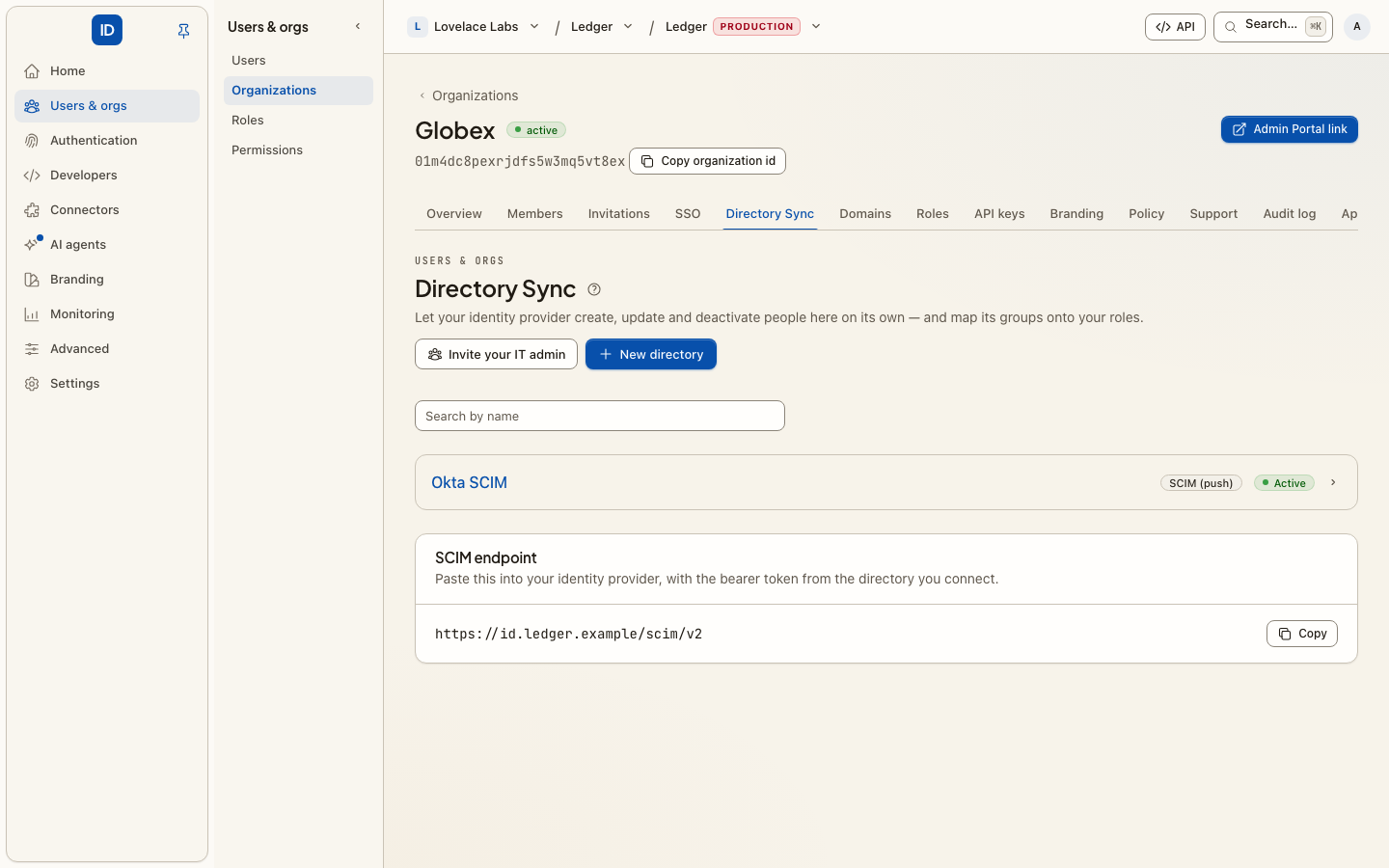
With Directory Sync, your identity provider — not you — decides who exists here. It creates people when they join, updates them when their details change, and deactivates them when they leave, over a standard called SCIM 2.0.
Enterprise SSO and Directory Sync solve different halves of the same problem. SSO answers "is this really them?" at the moment they sign in. Directory Sync answers "should this person exist at all?" continuously — which is what closes the gap where a leaver still has a working account somewhere because no one filed a ticket.
Two ways to connect
Cbox ID pulls — for Google Workspace and Microsoft Entra, connect the directory
directly on the page with admin credentials. Cbox ID reads users and groups hourly,
via cbox-id:directory:sync, which is scheduled for you — so this needs the platform's
scheduler to be running (php artisan schedule:work, or a cron entry calling
schedule:run). Without it a directory syncs once, when you connect it, and never again.
Nothing to configure on the provider side beyond consent.
Your provider pushes — for Okta, OneLogin, or anything else that speaks SCIM.
Register a directory here to get a bearer token, then point your provider at the
SCIM base URL shown on the page (/scim/v2 on your Cbox ID host) and authenticate
with that token.
Before you start
- Directory Sync is an Enterprise feature. If the page says so instead of showing the directories, the organization's plan does not include it yet.
- If somebody else administers the identity provider, you do not have to collect their admin credentials. Send them an Admin Portal link that covers Directory Sync: they create the directory and paste the token into their provider themselves, without an account here.
Set it up
- Choose New directory, pick the Provider, and give it a Directory name (what your team calls it, for example "Okta"). For Google Workspace, paste the Service-account JSON key and the Admin email to impersonate; for Microsoft Entra, the Tenant ID, Client ID and Client secret. Those credentials are checked against the provider before anything is stored. The bearer token is For a SCIM directory, the bearer token is shown once: store it in your provider immediately.
- In your provider, assign the people and groups that should have access. Only what you assign is sent; a SCIM connection does not mean "everyone in the company" unless you scope it that way.
- Watch the first sync land. Directories show as Active or Paused, with the last error if one occurred.
- Map the groups your provider sends onto your roles. This is the part
worth doing carefully: once
Engineeringmaps to a role, access follows group membership, and you stop granting anything by hand.
From code
Every step is an action, on the management API, MCP and the CLI alike:
| Action | REST | Scope | Danger |
|---|---|---|---|
directories.list, directories.get |
GET /api/v1/directories, GET /api/v1/directories/{id} |
directory_sync:read |
read |
directories.create (a SCIM directory) |
POST /api/v1/directories |
directory_sync:write |
critical |
directories.connect (Google Workspace or Entra) |
POST /api/v1/directories/connect |
directory_sync:write |
critical |
directories.update |
PATCH /api/v1/directories/{id} |
directory_sync:write |
write |
directories.status.set (pause or resume) |
POST /api/v1/directories/{id}/status |
directory_sync:write |
write |
directories.token.rotate |
POST /api/v1/directories/{id}/rotate |
directory_sync:write |
critical |
directories.groups.list |
GET /api/v1/directories/{id}/groups |
directory_sync:read |
read |
directories.groups.map |
POST /api/v1/directories/{id}/group-roles |
directory_sync:write |
write |
directories.delete |
DELETE /api/v1/directories/{id} |
directory_sync:write |
destructive |
The critical ones mint or replace a credential, so a key with an approval policy may wait for a person first (step-up approvals).
Rotate bearer token issues a fresh token and the old one stops working at once, so update your provider right after. Delete directory stops provisioning and removes the group mappings; the people it created stay.
Things worth knowing
- Deactivation is the point. Confirm that deactivating a test user in your provider deactivates them here. If it does not, your provider is probably not configured to send deactivations, and the whole arrangement is only doing half its job.
- The token is a credential. Anyone holding it can create and deactivate people in your organization. Rotate it if it has ever been in a chat message or a ticket.
- Group mapping is push-based. Everyone in a mapped group gets the role; remove the mapping and the grant goes with it.
What the SCIM endpoint does
What a provider pushing to /scim/v2 can rely on, and what changed in Cbox ID's
framework (laravel-id 1.23):
- A duplicate
externalIdis409 uniqueness, and so is a duplicate group name. Creating a user used to update the existing one; Entra ID and Okta both expect the409and then match the user with a filter. A script that relied onPOSTas an upsert must look the user up (?filter=externalId eq "…") andPUTorPATCHinstead. Changing a provisioned user'sexternalIdis refused (400 mutability). - Filters take the full RFC 7644 grammar: every operator,
and/or/notwith their precedence, grouping, value filters (emails[type eq "work"].value) and date comparisons. A filter on something the directory does not store is400 invalidFilter, never an unfiltered answer. - Sorting with
sortByandsortOrderon/Usersand/Groups. - ETags: a weak
ETagandmeta.versionon every resource.If-Matchon a write answers412when the resource changed since it was read;If-None-Matchon a read answers304. - Bulk:
POST /scim/v2/Bulk, up to 1,000 operations and 1 MiB per request (CBOX_ID_SCIM_BULK_MAX_OPERATIONS,CBOX_ID_SCIM_BULK_MAX_PAYLOAD_SIZE), withbulkIdreferences andfailOnErrors. It counts once against the 120-a-minute limit.
The IT administrator's version, with the provider field names, is any SCIM 2.0 provider.
Troubleshooting
Nothing appears after connecting — nobody is assigned to the application in your provider. Assign users or groups there first.
"Could not connect … check the credentials and admin consent" — the service account or app registration lacks directory read permission, or admin consent was never granted in the provider.
Someone was created but has no access — creating a person is not granting them anything. Map their group onto a role, or assign one on the Members page.
Related
- Enterprise SSO — signing in the people Directory Sync creates.
- Admin Portal — let the customer's IT admin connect their directory.
- Directory Sync, for IT admins — what that IT admin is shown.
- Outbound provisioning — the same idea in the other direction.
- Roles — what group mappings actually grant.
- SCIM in the framework — the protocol details.